For the first few months, we tested Aiqaramba by hand. Someone would deploy to staging, click around for ten minutes, and call it good. We sell a product whose whole point is that nobody should have to do that. It took us embarrassingly long to notice.
Aiqaramba production now tests Aiqaramba staging. The hard part turned out to be reading the results: when a test fails, is our app broken, or did the agent get lost? This post covers how the loop works, what the first run found, and how we sort one kind of failure from the other.
The setup
We run two environments: production at app.aiqaramba.com, serving real customers, and staging at stag.aiqaramba.com, where new code lands first. On production we created a project called "Aiqaramba Staging" and pointed it at the staging URL. When production launches agents for that project, those agents open real Chrome browsers on our Selenium Grid and navigate staging like any customer would.
The same product, testing itself across environments.
The pipeline
The framework has five layers, and none of them knows anything specific about the app under test:
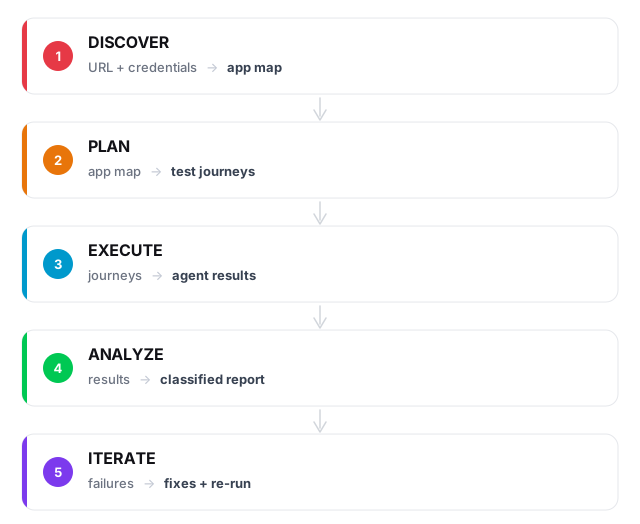
Starting from a URL and login credentials, the system explores the app and maps the pages and forms it finds. It generates tests, runs them in real browsers, and uses the results to plan the next cycle.
The same framework works for any web app we onboard. A URL and a login get discovery started. Someone who knows the product still has to review the generated tests, because a crawler cannot tell which flows the business depends on.
A test covers one focused task. Test plans chain tests into larger workflows, with dependencies, separate browser sessions and data passed between steps. An invitation flow, for example, is an administrator sending an invite, a second user accepting it in another browser, and the administrator checking that the new user shows up.
The first run
On 10 March 2026 production launched 19 agents against staging. Each had one mission: sign up, log in, create a project, run a discovery, upload a file, submit an empty form.
Seventeen of the nineteen passed on the first run. Between the two failures and the notes in the reports of the ones that passed, we ended up with six findings:
- 3 real bugs: sidebar links missing, a 500 error on a core endpoint, and a schema drift between staging and production
- 3 UI gaps: delete buttons used
window.confirm(), which the agents could not interact with, and two pages had no edit form at all
All three bugs were fixed and their tests re-run the same day.
The window.confirm() finding is the one that stuck with us. Our agents drive the browser through Selenium, and native browser dialogs sit outside the page they can see. We had built a whole category of actions our own product could not test. We swapped them for in-page confirmation dialogs, and the agents could finish the delete flows.
Sorting the failures
We coordinate the runs with a frontier model, currently through Claude Code, and we steer it. It reads our testing policies, launches agents through a runner script, watches for stuck runs, and writes up the results.
When agents finish, every failure gets one of four labels:
prompt_gap:   Agent couldn't find the button  ->  refine the prompt
app_bug:      Page returned a 500 error       ->  fix the code
infra:        LLM hung for 10 minutes         ->  stop and retry
budget:       Agent ran out of iterations     ->  raise the limit
The label decides what happens next. A prompt gap gets a better prompt, an app bug gets a code fix, an infrastructure issue gets a retry. Without the label, every red test looks like a bug.
Between runs
After each run we look at four things:
Coverage gaps. Compare the discovery map against the pages agents actually visited. A page nobody reached gets a test.
Shared failures. If three different agents fail on the same page, that is usually one problem showing up three times.
Struggling tests. We track success rate and iteration count per test. A test that keeps needing more than 60 iterations usually has a vague prompt, though sometimes the flow really is that long. One that passes in 11 can have its budget tightened.
Regressions. A test that passed last run and fails now gets flagged. Then the question is whether staging changed or the agent behaved differently.
When the model gets better
The first run used Gemini 3 Flash. It worked, with a hang rate around 30% and prompts that needed careful wording. When we switched to a newer model, agents completed the same tasks in fewer iterations with less hand-holding, and we had not changed a line of our code. We have not yet measured whether that also means better coverage.
Where we are now
We still test our own platform with Aiqaramba, and it has not closed the gap. We build and change features faster than we update the tests that cover them, and bugs still reach production. The first run found problems we had missed by hand. Keeping the tests level with the product is the part we have not solved.